Hours in.
Take-home out.
ClockWage44 is an hours tracker with a real paycheck engine built in. Log shifts across as many jobs as you want — federal tax, state tax, FICA, overtime, and deductions, all done to the cent.
Three taps from
shift to paycheck.
ClockWage44 is a free hours tracker with a paycheck engine built in. Log your week, set your rules, and see the real take-home number — no account, no clutter.
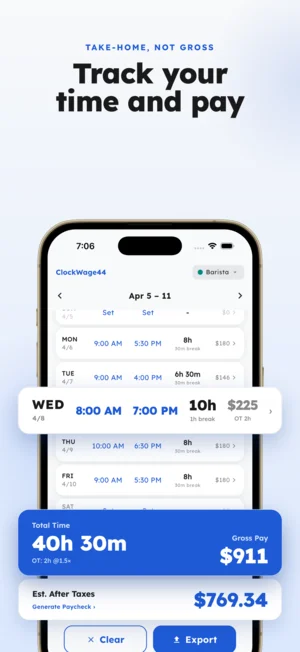
Log the week
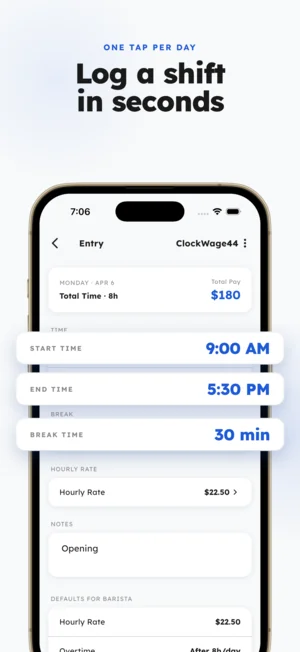
Tap a day, punch in start, end, and break. One job or many — each with its own rate, color, and rules. Everything stays on your device.
Apply your rules
Overtime, filing status, deductions, additional income, pay period. Set it once on the job and it rides with every paycheck.
See the real number
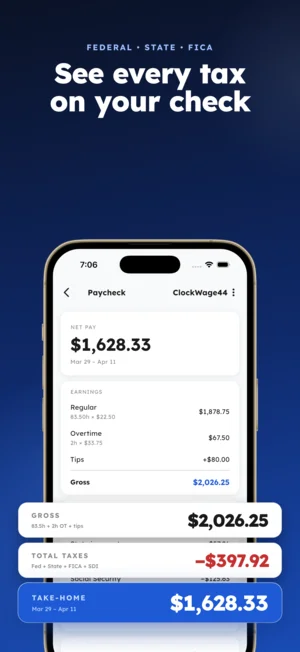
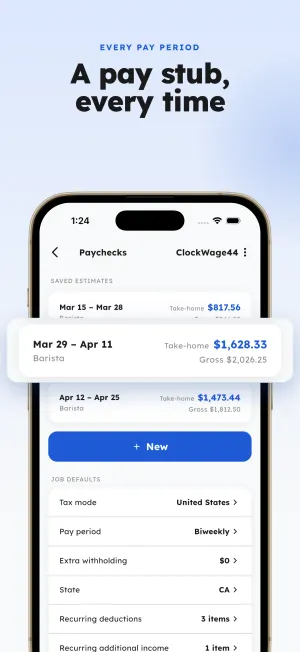
The paycheck engine runs federal tax, state tax, FICA, deductions, and additional income — line by line, to the cent.
A real paycheck,
not a guess.
Most hours apps stop at a total — hours times rate. Your actual paycheck is nothing like that. Federal income tax follows progressive brackets by filing status. Every state has its own bracket table. FICA adds Social Security at 6.2% to the wage base and Medicare at 1.45%, plus a 0.9% surcharge for high earners.
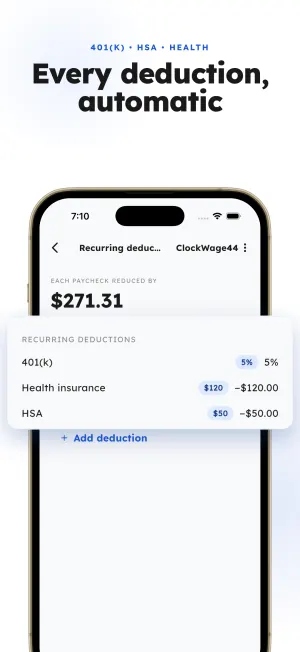
ClockWage44 runs all of it. Overtime can fire daily (over 8h), weekly (over 40h), or be entered by hand, with a multiplier you choose. Pre-tax deductions like a 401(k) or health insurance come off before tax; tips and additional income are folded in. The result is a take-home figure calculated line by line, to the cent — so nothing drifts.
Built for shifts that
don't sit still.
Multiple jobs, uneven weeks, manual overtime, split shifts, tips, and a half-dozen deductions — ClockWage44 handles all of it.
Week grid
A 7-day grid is home base. Every day shows a live pay preview from the active job’s rate, and weekly totals — hours, gross, overtime — roll up automatically.
Multi-job
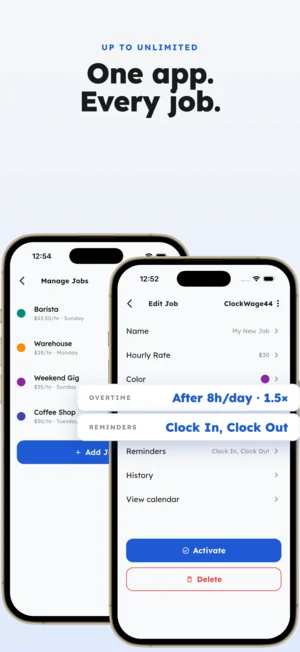
Each job carries its own rate, color, state, filing status, overtime mode, deductions, and reminders. Switch the active job from anywhere.
Overtime
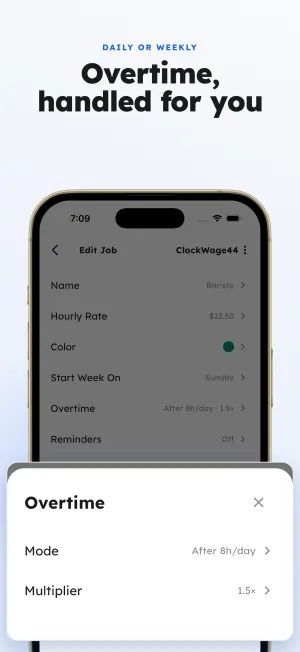
Configure overtime the way your job actually works — over 8h a day, over 40h a week, or add buckets by hand. The multiplier is up to you.
Calendar
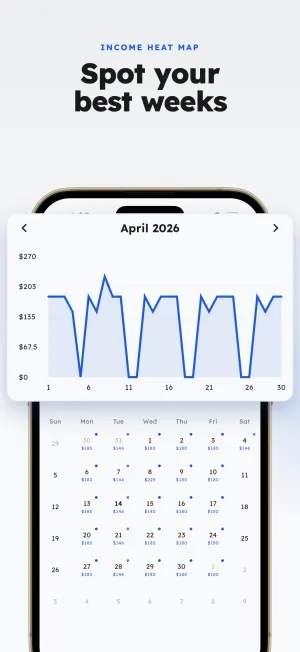
A month view that shades days by earnings — an income heat map — plus an income-over-time chart and drill-down into any shift.
History
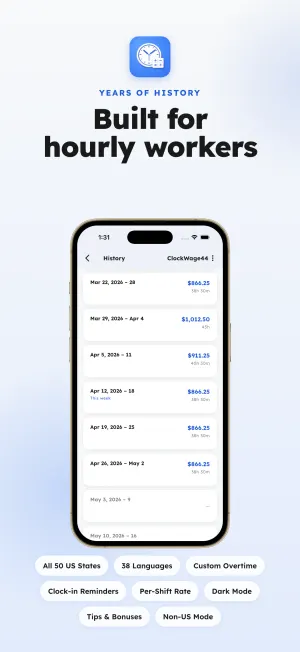
Every job keeps a 200-week history of hours and earnings. Jump back to any past week in seconds.
Reminders
Per-job clock-in and clock-out reminders at a chosen time and day of week. Timezone-aware, so travel weeks don’t throw things off.
Exports
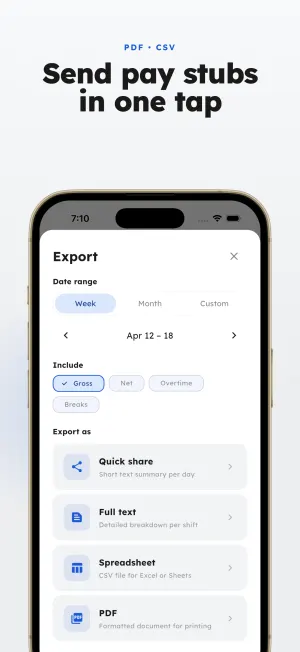
Branded PDFs for your employer or accountant, or CSV for a spreadsheet — by week, by month, or a custom date range.
Global
Available in 38 languages. Outside the US? Skip the tax engine and set a flat take-home percentage instead.
Minimal on the surface.
Serious underneath.
From the weekly grid to the line-by-line paycheck ledger — every screen built for the way real shifts work.
Answers about hours,
overtime, and pay.
Everything people ask before they download — overtime rules, paycheck math, exports, and privacy.
01 How does ClockWage44 track hours across multiple jobs?
Each job carries its own hourly rate, color, state, filing status, overtime rule, and deductions. Punch in start, end, and break for any day, and the active job's rules apply automatically. Switch jobs from anywhere — every shift you log keeps its own paycheck preview.
02 How is overtime calculated?
Set overtime the way your job actually works: over 8 hours in a day, over 40 hours in a week, or entered by hand for split-shift situations. You choose the multiplier (1.5×, 2×, or custom), and ClockWage44 applies it automatically when the threshold is hit.
03 Does ClockWage44 calculate my actual take-home paycheck?
Yes. The built-in paycheck engine runs federal income tax (progressive brackets by filing status), state tax for all 50 states and DC, FICA (Social Security + Medicare), pre-tax deductions like 401(k) and health insurance, and additional income like tips — line by line, to the cent.
04 Can I export my hours and paychecks?
Yes. Export a branded PDF for your employer or accountant, or a CSV for a spreadsheet. Filter by week, month, or a custom date range. Both formats include every shift, every paycheck breakdown, and your job-level settings.
05 Is my pay and shift data private?
Everything stays on your device. ClockWage44 doesn't require an account, doesn't sync to a server, and never transmits your hours, pay, or paycheck data anywhere. Your week is yours alone.
06 How much does ClockWage44 cost?
ClockWage44 is free to download on iOS and Android. No sign-up, no subscription required for core hours tracking and paycheck calculation.
See your real take-home
on every shift.
ClockWage44 is free. No sign-up. Your hours and pay never leave your device.